Design system of any website, ready for AI
Paste a link to a website or a Wix template. In a minute you get the palette, fonts, spacing, section structure and a prompt any AI can build an original site from.
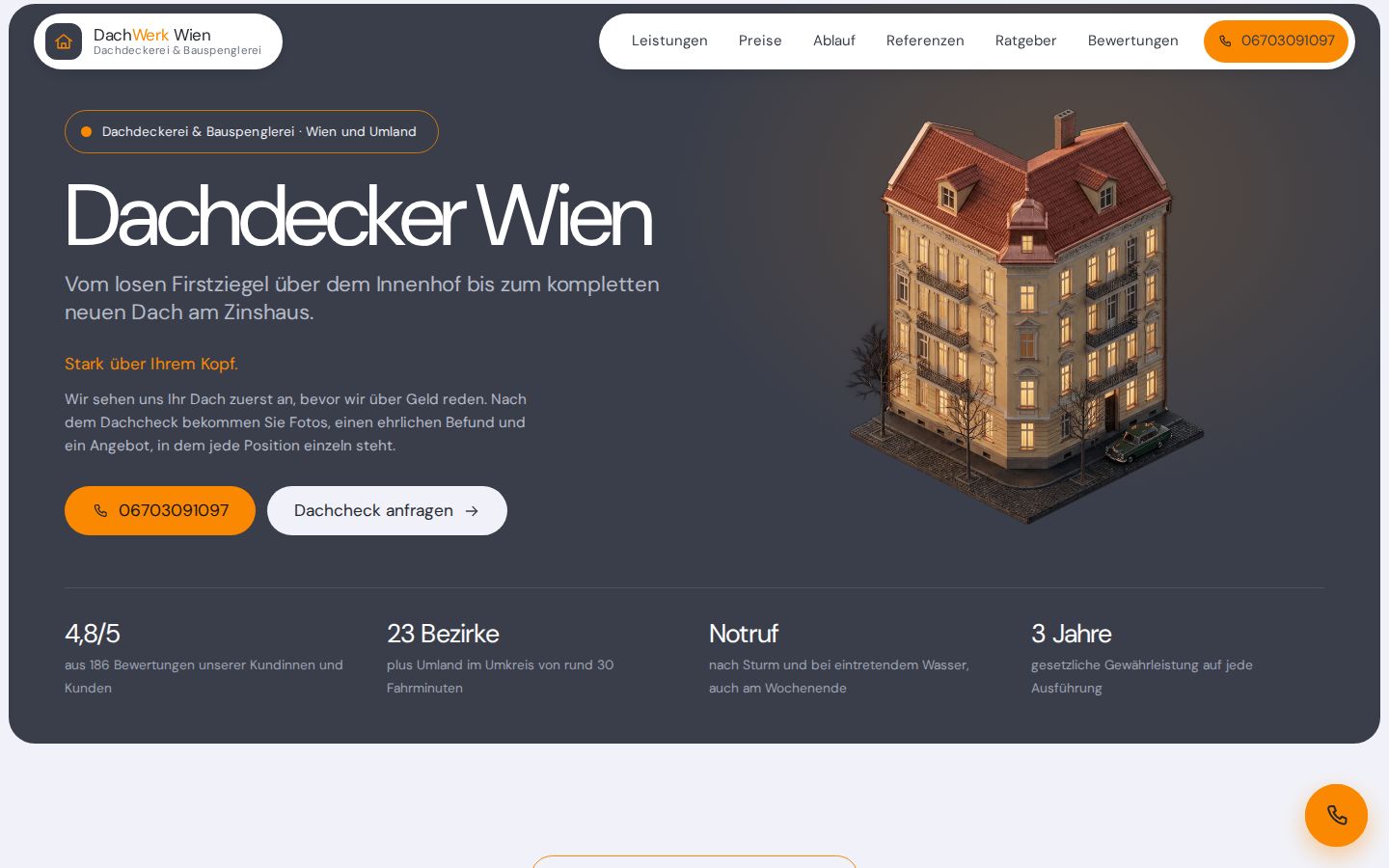 Example
Dachdecker Wien | Dachreparatur, Dachsanierung & Spenglerarbeiten – DachWerk Wien
dachdeckerwien.com- Fonts
- DM Sans
- Structure
- 36 sections, 20 repeated components
- Responsive
- breakpoints 390 / 768 / 1024, mobile version captured separately
- Grid
- step 5px, container 980px, radii 10px, 14px, 27px
How to use it
- Paste a linkTo a site or a Wix template — and press “Get the design system”.
- Wait a minuteUsually 30 seconds to a minute and a half. You can watch it go stage by stage.
- Look at the resultWhat the site looks like, the palette, fonts, structure. Click a colour to copy it.
- Hand it to an AIPress “Copy the prompt”, paste it into an AI chat and attach the lighter archive. If your AI works with a project folder, take the full one — “Download the archive”.
- Come back when you need itThe result has its own link you can share; it lives for up to 7 days from the analysis. This browser remembers your results, and with an account they are under “My account” on any device.
What a website design system is
A design system is the set of rules a site is built by: which colours go on the backgrounds, the text and the buttons, which fonts and sizes the headings are set in, the spacing step, how the corners are rounded, the order of the sections and how the page rearranges itself on a phone.
The tool recovers those rules from a finished page: it opens the page in a browser on our server, measures the design and writes it into files that both a person and an AI can read. A site you like becomes the model an AI builds your own from — in the same style, but with your own texts and pictures.
What you get
- Palette — background, text, accent and border colours with their roles and contrast, and how the colours change on hover.
- Fonts — families, sizes, weights and line heights of the headings and the text. Fonts without a free licence come with free alternatives.
- Spacing and shape — the spacing step, the container width, corner radii and shadows.
- Structure — the sections from top to bottom: layout, columns, repeated cards and headings.
- Mobile version — how the sections rearrange on a phone, the font sizes there and what is hidden.
- Screenshots — of the full page at every width, of each section and of the mobile version.
The key parts show on the page straight away; all of it is in a report for people and in the full archive for an AI, and a lighter archive is made for uploading into a chat.
How to hand the result to an AI
Press “Copy the prompt” and paste it into a chat with an AI — ChatGPT, Claude, Gemini or DeepSeek, for example. Replace the placeholder in square brackets with what your site is about and attach the lighter archive: it is made for uploading straight into a chat, where file size is capped.
If your AI works with files on your computer, as Cursor or Claude Code do, unpack the full archive into your project folder and give it the path. README.md inside tells it what to read in order.
We have no integrations with any of these services: the prompt and the archive are ordinary files, and any assistant that takes text and files can use them.
What the tool does not do
- It does not get past bot checks or solve captchas: if the site shows a check, the analysis stops.
- It does not sign in anywhere: it sees a page the way a visitor who is not signed in does. It does not open addresses on a local machine or an internal network.
- It analyses one page per link, not the whole site.
- It does not build the site itself: an AI does that from the archive.
- It does not guarantee that a font may be used: it counts a font as free when it finds its name in Google Fonts or another open catalogue, and can get it wrong.
Questions about the design system tool
How much does it cost?
Free up to a daily limit: 1 analysis a day without an account, 2 analyses with one. A paid Pro plan is sold on the Russian version of the site.
How long does it take?
Usually 30 seconds to a minute and a half: the page is captured at four screen widths and separately as on a phone.
What is inside the lighter archive?
DESIGN-BRIEF.md with the summary, ai-prompt.md with the task, tokens.css and JSON with the palette, type and spacing, the skeleton.html frame with the page’s texts, section and mobile screenshots, and the original fonts that have a free licence. The original images, CSS and HTML are not in it — only in the full archive.
Does it work with Tilda, Webflow, TemplateMonster?
Yes: like any public site, they go through the generic algorithm. From the link alone the tool recognises Tilda, Taptop, Webflow, Framer, Squarespace, Readymag, Craftum, Elementor, Start Bootstrap, TemplateMonster, ThemeForest, Envato Elements, Shopify, WordPress, HTML5 UP and Nicepage, and it turns a link to a template in the TemplateMonster, ThemeForest, Envato Elements, Webflow, Framer, Squarespace, Shopify, WordPress.org, Start Bootstrap, HTML5 UP, Nicepage or Craftum catalogue into its demo’s address for you. Wix has dedicated support: the template gallery, the preview page and the mobile layout.
Is this legal?
Layout, palettes and proportions are not protected by copyright, and that is what we measure. Texts, photos, logos and fonts are: in the result they are there as a reference, you may not publish them as your own, and the prompt explicitly asks the AI for an original site. What exactly goes into the archives is on the page for rights holders.